github-solo-skill

github-solo-skill
A GitHub settings checkup for one-person repos. It never locks you out of merging your own PRs.
Audit · safe auto-setup · free features only · undo with restore · Python standard library
Claude Code · Codex · Cursor · Copilot · any agent that reads SKILL.md / AGENTS.md, or speaks MCP








npx skills add kajisho5/github-solo-skill
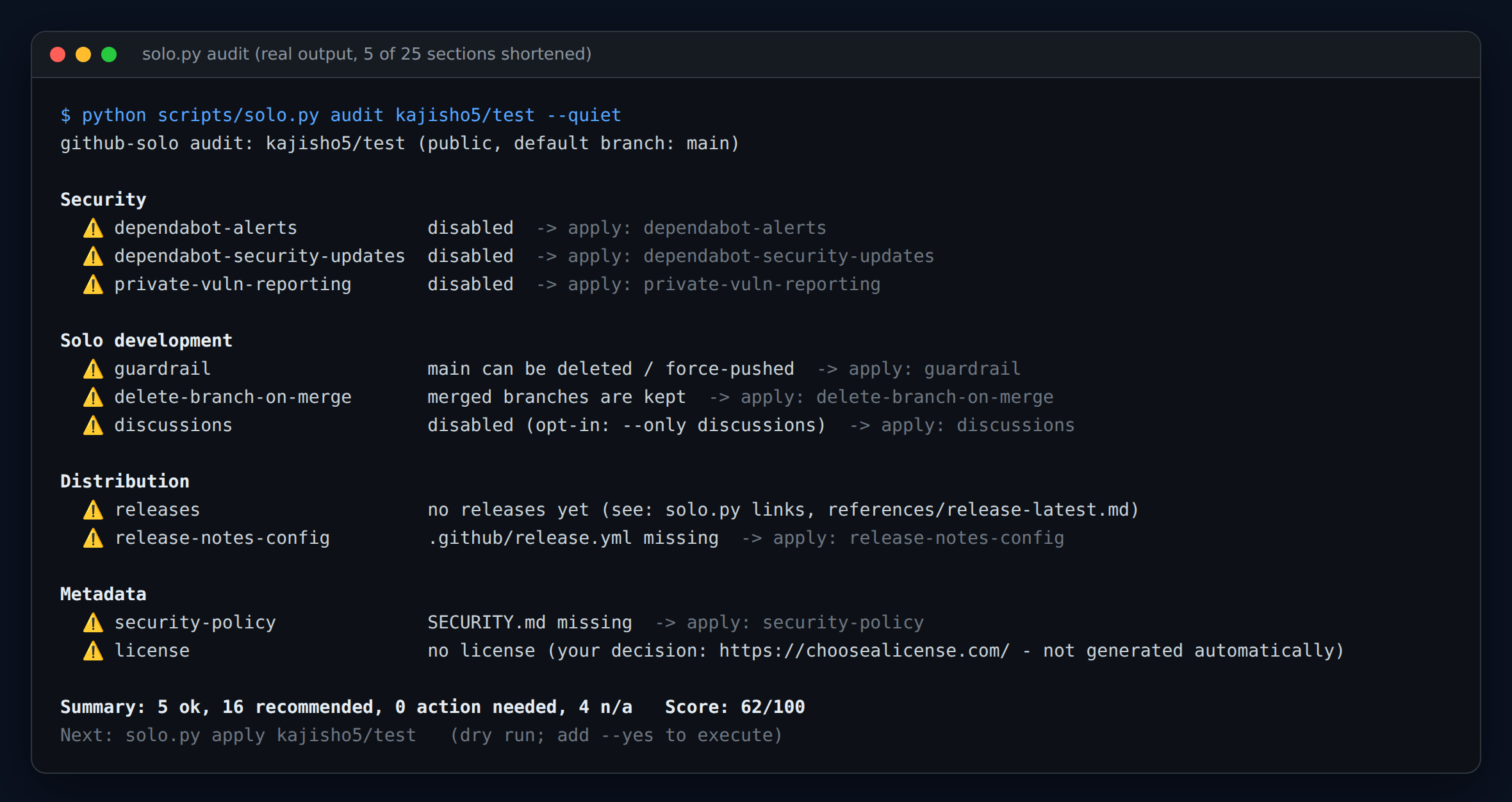
Real output against a scratch repo (sections shortened). Ask your agent "check my repo settings", or run python3 scripts/solo.py audit OWNER/REPO.
In 30 seconds
python3 scripts/solo.py audit OWNER/REPO          # 1. what is missing? (exit code 1 only for ❌)
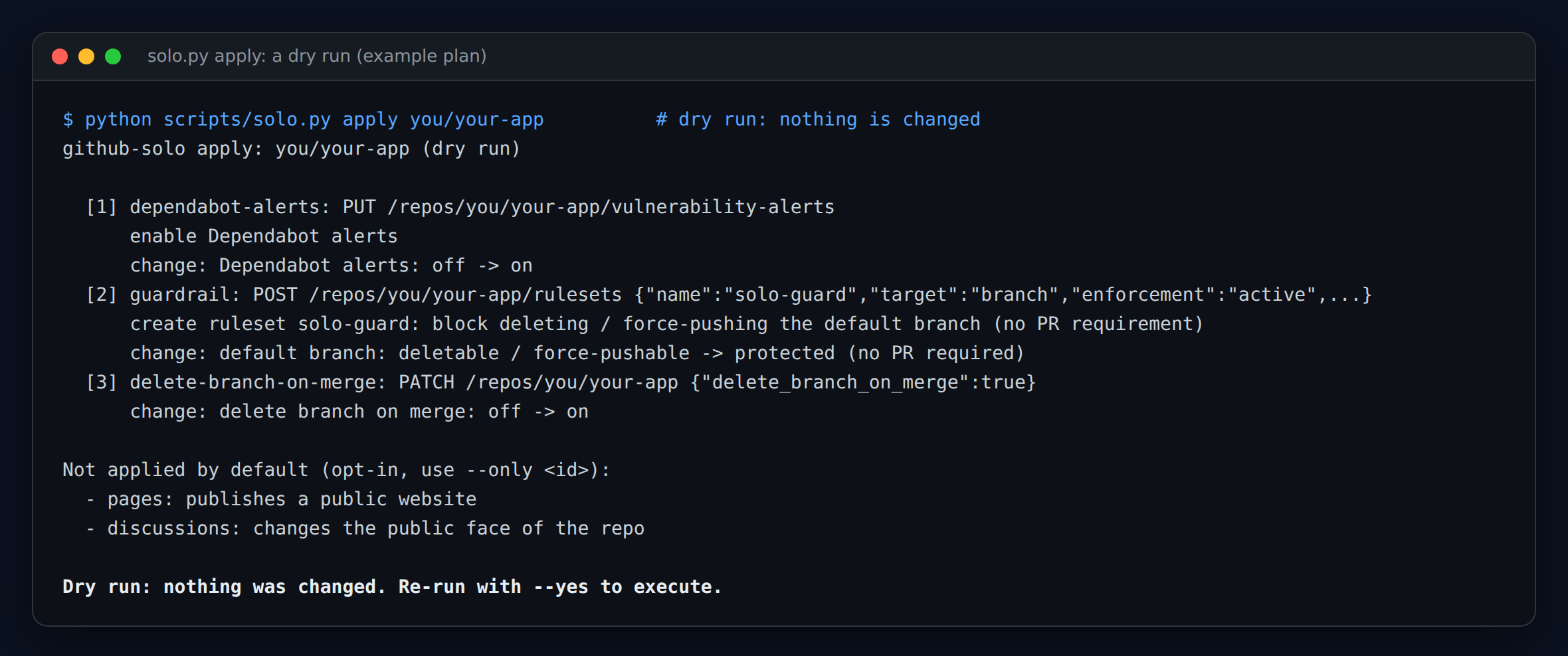
python3 scripts/solo.py apply OWNER/REPO          # 2. what would change? (dry run, nothing is written)
python3 scripts/solo.py apply OWNER/REPO --yes    # 3. do it (invisible, reversible items only)
python3 scripts/solo.py restore OWNER/REPO --yes  # 4. regret it? put it back
Public-facing items (Pages, Discussions, topics …) are never applied unless you name them: apply --yes --only pages.
Why this exists
Team-oriented GitHub skills (for example netresearch/github-project-skill) switch on branch protection that requires an approving review,
often plus CODEOWNERS review and enforce_admins. With one maintainer nobody can approve, so you can no longer merge your own PRs.
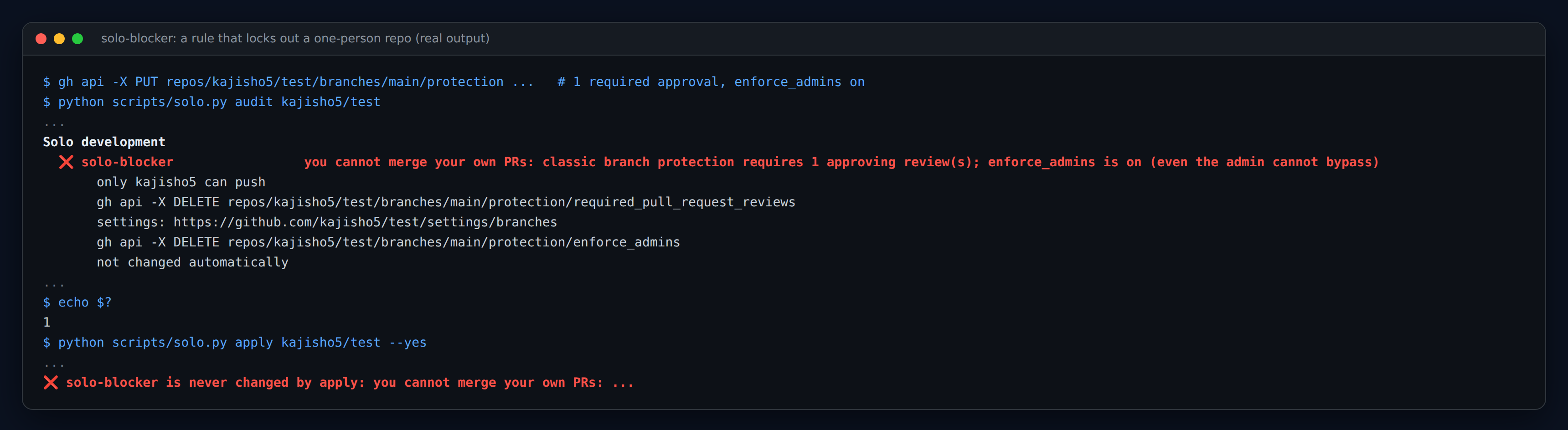
github-solo is built on the opposite rule. Here is what it does when it meets such a repo (real output):
| Team-oriented skills | github-solo | |
|---|---|---|
Required approvals / CODEOWNERS review / enforce_admins |
added | never added. An existing one on a single-committer repo is flagged ❌ with the commands to remove it, and never changed automatically |
| Protection of the default branch | PR-only | ruleset solo-guard: no deletion, no force-push. Direct pushes and your own merges keep working |
| Paid features | assumed | free features only. On private repos the paid ones are shown as ➖ and skipped (see below) |
What apply changes by default |
everything | only invisible, instantly reversible items. Public-facing items and anything that can break a workflow need an explicit --only |
| Existing files and settings | may be overwritten | never deleted or overwritten |
| Mistakes | fix them by hand | restore reverts exactly what the last apply --yes changed |
More background: docs/why-solo.md.
How it works
flowchart LR
  A[audit] --> B{result}
  B -- "❌ solo-blocker" --> C["shows the fix commands<br/>never changes it"]
  B -- "⚠️ recommended" --> D["apply (dry run)<br/>exact API calls, before -> after"]
  D -- "you agree: --yes" --> E["apply executes<br/>saves an undo snapshot"]
  E --> F[audit again]
  E -. "regret" .-> G[restore]
What is checked (31 checks)
Details, the API used and how to undo each one: references/checks.md, or solo.py explain CHECK_ID.
| Category | Check (apply id) | apply |
|---|---|---|
| Security | dependabot-alerts, dependabot-security-updates |
default |
secret-scanning, push-protection, private-vuln-reporting, codeql (public repos) |
default | |
dependabot-config: generates .github/dependabot.yml from the detected ecosystems (monthly, one grouped PR each); an existing file is only compared |
default | |
actions-pinning: workflow actions pinned to a commit SHA |
report only | |
actions-hardening: workflows without permissions:, pull_request_target checking out PR code, untrusted values expanded in run: (text heuristic) |
report only | |
actions-can-create-prs: release-please / create-pull-request fail when Actions may not create PRs |
opt-in | |
open-alerts: open Dependabot alerts by severity |
report only | |
workflow-permissions: default GITHUB_TOKEN read-only |
opt-in | |
| Solo development | solo-blocker: approval-required rules that lock out a one-person repo |
❌ detect only |
guardrail: ruleset solo-guard (no delete / force-push of the default branch, no PR requirement) |
default | |
tag-guard: ruleset solo-tag-guard for v* tags |
opt-in | |
delete-branch-on-merge |
default | |
discussions |
opt-in | |
| Distribution | pages (folder auto-detected, homepage filled in) |
opt-in |
releases: any release, a “latest” with downloadable assets, asset names without versions |
report only | |
release-workflow: a push to the default branch may create a release |
report only | |
ci-status: the latest run of each workflow on the default branch passed |
report only | |
release-tag-format: the newest tag is a plain vX.Y.Z (release-please adds the package name by default) |
report only | |
release-notes-config: .github/release.yml |
default | |
| Metadata | security-policy: SECURITY.md pointing to private vulnerability reporting |
default |
description, license (never generated), social-preview (no API), issues-enabled |
report only | |
topics (--topics a,b), labels (for release.yml), community-files (issue / PR templates, CONTRIBUTING) |
opt-in |
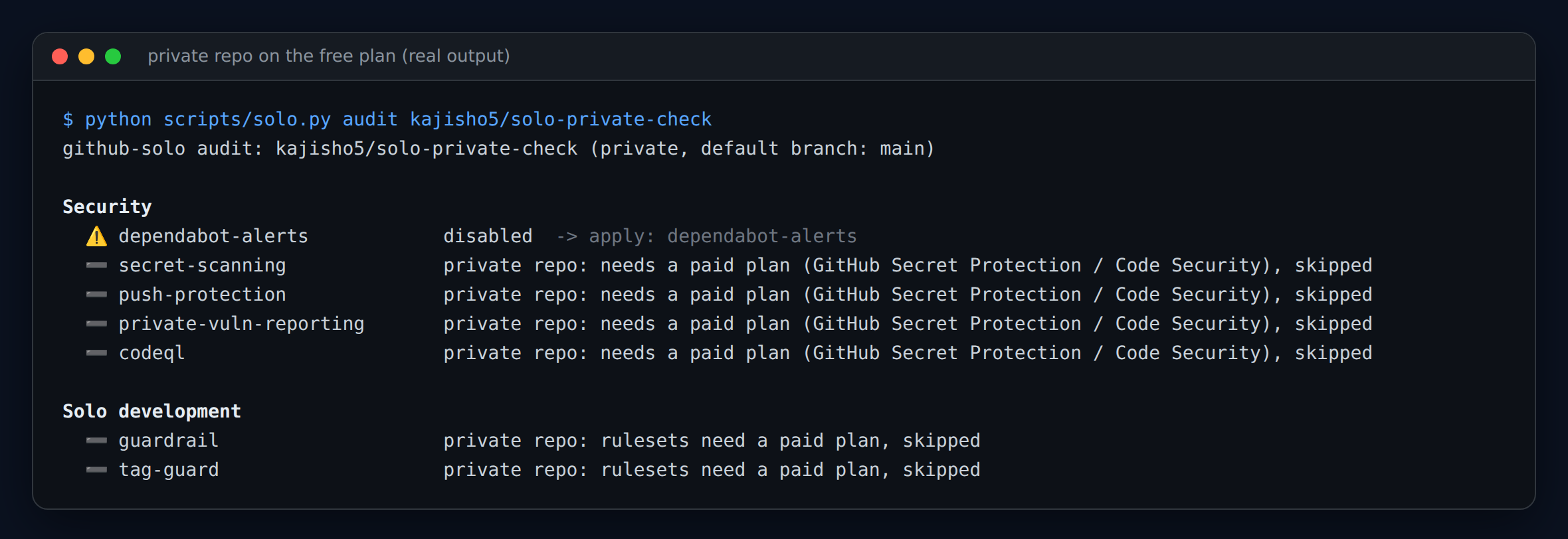
Private repos: GitHub Secret Protection / Code Security are paid, so secret-scanning, push-protection, private-vuln-reporting and codeql are ➖ with the reason; rulesets need a paid plan too (➖ for guardrail / tag-guard). Dependabot alerts and updates stay free and are applied.
“Push may release” warning: if a workflow runs on pushes to the default branch and looks like it creates releases (gh release create, softprops/action-gh-release, release-please, contents: write …, also through called reusable workflows), apply warns before it writes files, and --commit-files is refused unless you add --accept-release-risk. Detection is a text heuristic.
Commands
| Command | What it does |
|---|---|
audit [OWNER/REPO] [--json] [--quiet] [--ignore ids] [--fail-on warn] [--profile app\|library\|site\|docs] [--github-annotations] |
diagnose; exit 1 if any ❌ (--fail-on warn: also on ⚠️). Prints a 0-100 score |
audit --all-repos OWNER [--json] |
one line per non-archived, non-fork repo of an owner |
apply [OWNER/REPO] [--yes] [--only ids] [--skip ids] [--pages-path / \| /docs] [--topics a,b] [--commit-files] [--accept-release-risk] [--json] |
dry-run plan; --yes executes |
restore [OWNER/REPO] [--yes] [--snapshot FILE] |
revert what the last apply --yes changed |
doctor [OWNER/REPO] [--json] |
where it runs (cloud container / Claude Code on your machine / plain shell), token source (never printed), API reachability, your access to each admin endpoint |
links [OWNER/REPO] [--markdown] |
stable /releases/latest/download/<asset> URLs, or why none can work (only pre-releases, version in the asset name) |
links --workflow |
a release workflow template that uploads version-less asset copies |
dependabot [OWNER/REPO] |
print a generated dependabot.yml |
badges [OWNER/REPO] |
README badge Markdown |
explain CHECK_ID |
why / API / how to undo one check (offline) |
ci-template |
a weekly audit GitHub Actions workflow |
OWNER/REPO may be omitted inside a clone (read from git remote origin). --lang ja (or SOLO_LANG=ja, or a Japanese $LANG) translates the text output; --json is always English.
On GitHub Enterprise Server set SOLO_API_BASE=https://HOST/api/v3. More examples: docs/recipes.md.
Generated files
dependabot.yml, release.yml, SECURITY.md and the community files are created only if missing: written locally inside a clone (you review and commit them), or with --commit-files committed straight to the default branch through the Contents API. Existing files are never touched.
Token permissions
The token comes from GH_TOKEN, then GITHUB_TOKEN, then gh auth token.
- Classic PAT:
repo(for public repos only,public_repocovers the code-scanning endpoint; the other admin endpoints are documented againstrepo). - Fine-grained PAT, repository permissions (from the GitHub docs; not measured per endpoint):
| Permission | Level | For |
|---|---|---|
| Metadata | Read | repo info, collaborators |
| Administration | Read and write | Dependabot, private vulnerability reporting, code scanning, rulesets, branch protection (read), Actions workflow permissions, repo settings (PATCH) |
| Contents | Read (audit) / Read and write (--commit-files) |
git tree, file contents, committing generated files |
| Pages | Read and write | --only pages |
You must be an admin of the repo for most settings. 403/404 and plan limits: references/troubleshooting.md. Run solo.py doctor OWNER/REPO first when something fails.
Install
# Skills CLI (Claude Code, Cursor, Codex, ...)
npx skills add kajisho5/github-solo-skill

# or clone into your agent's skills directory
git clone https://github.com/kajisho5/github-solo-skill ~/.claude/skills/github-solo   # Claude Code
git clone https://github.com/kajisho5/github-solo-skill ~/.cursor/skills/github-solo   # Cursor
git clone https://github.com/kajisho5/github-solo-skill ~/.agents/skills/github-solo   # Codex (Cursor reads this too)
Other AI agents (Codex, Cursor, Copilot, Gemini CLI, …)
| Agent | How |
|---|---|
| Codex | skills: clone into ~/.agents/skills/github-solo (user) or <repo>/.agents/skills/github-solo (repo), per the Codex skills docs. MCP: codex mcp add github-solo -- python3 /path/to/github-solo/scripts/solo_mcp.py or a [mcp_servers.github-solo] table (command, args) in ~/.codex/config.toml (docs). Codex also reads AGENTS.md. Codex desktop app (Windows): Settings → MCP servers → Add server → STDIO, command python, argument the full path of scripts\solo_mcp.py (the app shares config.toml with the CLI, per the docs; the docs do not cover Windows paths specifically, and this was not tried in the app). |
| Claude Code | skill (above), plugin (below), or MCP: claude mcp add github-solo -- python3 /path/to/github-solo/scripts/solo_mcp.py |
| Cursor | skills directory ~/.cursor/skills/github-solo (path as documented by the sibling project ffmpeg-skill; Cursor reads ~/.agents/skills too). Not verified against Cursor’s own docs. |
| GitHub Copilot | reads AGENTS.md and .github/copilot-instructions.md in this repo (docs). |
| Any other agent | MCP stdio server python3 scripts/solo_mcp.py (tools: solo_doctor, solo_audit, solo_apply_plan, solo_apply, solo_restore, solo_links, solo_dependabot, solo_badges, solo_explain), or just run python3 scripts/solo.py ...; point the agent at AGENTS.md. |
The MCP server follows the MCP stdio transport (newline-delimited JSON-RPC, protocol versions 2025-06-18 / 2025-03-26 / 2024-11-05) and was tested with a hand-written client and with Claude Code’s own client (claude mcp list reports it connected); Codex and Cursor have not been tried. solo_apply and solo_restore change nothing unless confirm is true.
As a Claude Code plugin (marketplace hosted in this repo):
claude plugin marketplace add kajisho5/github-solo-skill
claude plugin install github-solo@github-solo-skill
Without any agent: python3 scripts/solo.py --help. Update a clone with git pull; copies made by other installers are not updated automatically. On Windows use python if python3 is not on your PATH.
How well is it tested?
- 65 unit tests, no network. A mock GitHub API server runs in-process; each scenario asserts the audit verdicts, the dry-run plan and the exact write requests (method, path, body). They run in CI on Python 3.9 and 3.13 (Linux) and 3.13 (Windows).
- Against the real GitHub API (a public scratch repo, run from Windows): every item below was applied and reverted, and a before/after audit of all 25 checks was identical.
codeql,delete-branch-on-merge,dependabot-alerts,dependabot-security-updates,discussions,guardrail,labels,pages,private-vuln-reporting,tag-guard,topics,secret-scanning,push-protection,workflow-permissions;solo-blockerthrough classic branch protection and through a ruleset (flagged, exit code 1, never changed); generated files written locally and committed with--commit-files;dependabot.ymlgenerated from real manifests; a private repo on the free plan (paid items ➖, nothing paid planned). - Not tried live: organization-owned repos, GitHub Enterprise Server, the
--commit-filesrelease guard on a repo that really has a release-on-push workflow, fine-grained tokens per endpoint. Full list: ROADMAP.md.
Requirements
- Python 3.9+ (standard library only),
git(only to inferOWNER/REPOand detect a clone), optionallygh(only as a token source). - A GitHub token with the permissions above.
Development
python -m unittest           # all tests, no network
python -m unittest tests.test_solo.VoiceboothScenario -v

# against the real API, on a disposable repo you own (changes its settings, then reverts them):
python3 tests/live_check.py YOU/scratch-repo --confirm YOU/scratch-repo

python3 assets/build_assets.py   # rebuild the images (needs Chromium and ffmpeg / ImageMagick)
Scenarios live in tests/test_solo.py (fixtures in tests/fixtures.py, server in tests/mock_github.py). See CONTRIBUTING.md.
Releasing is automated with release-please: merge Conventional Commits (feat:, fix:, docs: …) to main, release-please keeps a release PR up to date (version in plugin.json and scripts/solo.py, changelog), and merging that PR tags and publishes the GitHub Release. A major version is never bumped automatically: the project stays on 0.x (bump-minor-pre-major), so a breaking change (feat!:) bumps the minor; 1.0.0 is a deliberate release (Release-As: 1.0.0 in a commit footer). The release PR needs Settings → Actions → General → “Allow GitHub Actions to create and approve pull requests” enabled.
Docs
| SKILL.md / AGENTS.md | what the agent reads: workflow and rules |
| docs/why-solo.md | the one-person lock-in problem, and the design rules that follow |
| docs/recipes.md | CI, many repos, stable download links, MCP, Windows tips |
| docs/faq.md | questions people ask |
| references/checks.md | every check: reason, API, revert |
| references/release-latest.md | stable latest-release links, pre-releases, version-less asset names |
| references/troubleshooting.md | 403 errors, scopes, private repo paid features |
| ROADMAP.md | what is done, what is still unverified, what is out of scope |
| CONTRIBUTING.md · SECURITY.md | contributing · reporting a vulnerability |
Support
If this saves you time, you can help keep it maintained through GitHub Sponsors. Issues and pull requests are welcome.